| The Autonerdz Community Forums | |
|
https://yabb.autonerdz.com/cgi/yabb2//YaBB.pl
General Public Area >> PicoScope >> what computer do you use to power your scope https://yabb.autonerdz.com/cgi/yabb2//YaBB.pl?num=1364589027 Message started by kicksbutt on Mar 29th, 2013 at 12:30pm |
|
|
Title: what computer do you use to power your scope Post by kicksbutt on Mar 29th, 2013 at 12:30pm
hello all I am curious what computers everyone is using to power their scopes. I will need to get a new computer to run my scope. my idea is something fairly lightweight and small so its easy to move around. I would like anyone else's input if you don't mind thanks ;)
|
|
Title: Re: what computer do you use to power your scope Post by Spence on Mar 29th, 2013 at 2:39pm
We use ToughBooks. CF-19 and CF-30
|
|
Title: Re: what computer do you use to power your scope Post by A_Phoenix on Mar 29th, 2013 at 3:24pm
I’ve got a Lenovo N580 with windows 8 here at the office. I would recommend the computer, although I personally wouldn't recommend windows 8... not that there’s much choice in the stores. I tend to believe in using a cheaper computer in the shop environment so that if/when it breaks it’s not a huge loss, plus it’s less likely to outlive its usefulness.
|
|
Title: Re: what computer do you use to power your scope Post by kicksbutt on Mar 29th, 2013 at 6:22pm
yea I heard windows 8 I need to stay away from that seems to be part of the issue trying to find something
|
|
Title: Re: what computer do you use to power your scope Post by Tom Roberts on Mar 29th, 2013 at 7:29pm Windows 8 works fine with PicoScope. But if you want to use any other software, you will probably spend more trying to get other applications to work than you will have paid for the PC. I know we have. You should still be able to order anything you want with Windows 7. |
|
Title: Re: what computer do you use to power your scope Post by Brad H on Mar 29th, 2013 at 11:08pm kicksbutt wrote on Mar 29th, 2013 at 12:30pm:
It really depends on who and where it's being used. I have a toughbook running XP pro for Ford IDS and Pico if needed (on roadtest). I chose the toughbook for a couple reasons. 1. They can take a bit of accidental mis-treatment 2. Can be used in direct sunlight 3. They can be configured tablet style to sit easily on toolbox,trolley or car seat. I just purchased a refirbished Dell Latitude E4300 laptop as a back-up to the toughbook and also to run JLR on seeing that program doesn't play nice with Ford IDS. In the workshop I have a pc built to the highest specs at the time and this is housed in a custom built mobile cabinet. This is my main pc and runs Toyota Techstream, Mazda, VAG-COM, autoenginuity and G-Scan wi-fi. It also hosts my Picoscope with a Datec boom. I actually prefer the desk-type pc's to laptop (power wise), but it depends on the room you have and if you have an assigned bay. |
|
Title: Re: what computer do you use to power your scope Post by magicmatt on Mar 30th, 2013 at 5:06am
hello, I run a HP Probook 4430s with windows 7 pro.
|
|
Title: Re: what computer do you use to power your scope Post by sidmann on Mar 31st, 2013 at 8:09pm Brad H wrote on Mar 29th, 2013 at 11:08pm:
hey brad, who or where did you get the gscan wifi dongle from? i've been trying to get hold of one but the rep here says they dont have it >:( |
|
Title: Re: what computer do you use to power your scope Post by Brad H on Apr 1st, 2013 at 4:43am
Hey Sidmann,
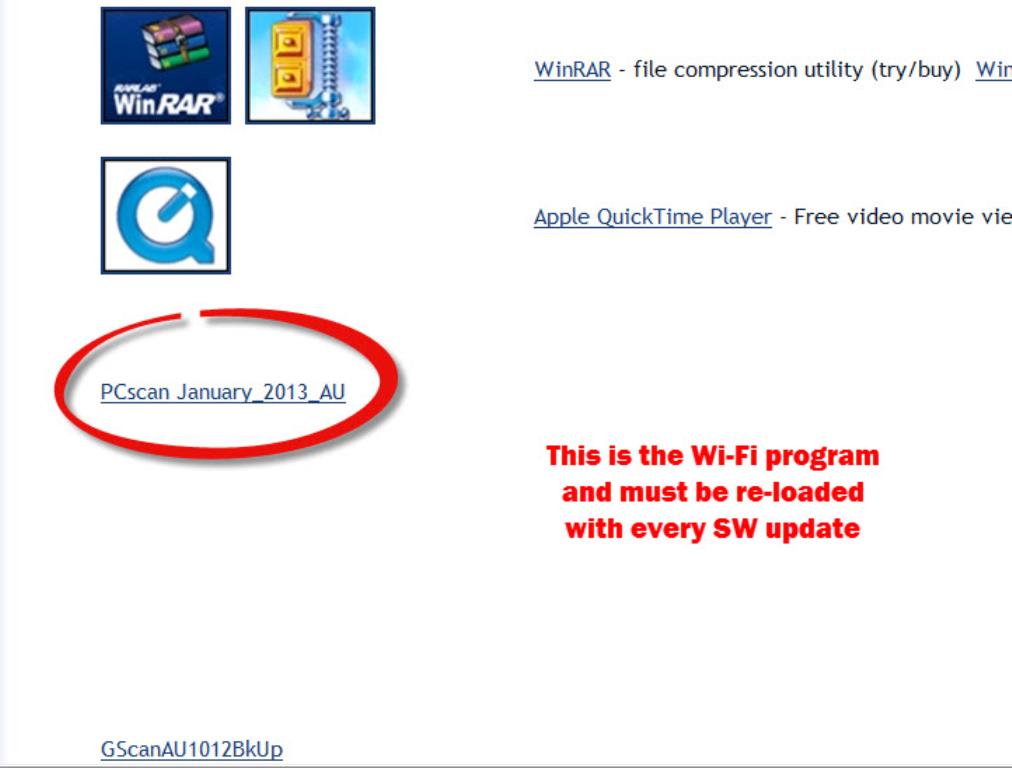
long time no hear mate. I bought the Wi-Fi kit directly from Clive at Mount Autoequip. I only use it for Diesel injector coding and some actuation testing, for this it's great. As far as viewing live data, it falls over,terribly! You can't reduce the pids viewed to increase the refresh rate (unless I'm mistaken) and it is ultra sloooooow... I rang Peter Crump with a query on it early last year and he couldn't help me,none of his customers had it. So I think there was a very little take-up with the kit. Maybe it's the fact it is priced North of $500, maybe the super-slow refresh rate? Let me know if you're still interested,I'll shoot a quick vid and send a link....................... Wifi_1012x768_.JPG (51 KB | ) |
|
Title: Re: what computer do you use to power your scope Post by sidmann on Apr 1st, 2013 at 10:10pm
that will be great brad, I'm definitely interested in one. i guess they didn't want to deal with any complaints from those who use it. as for pcscan, is it just the software for the PC or do i need to update the gscan unit as well to activate the wifi?
|
|
Title: Re: what computer do you use to power your scope Post by Brad H on Apr 2nd, 2013 at 4:13am sidmann wrote on Apr 1st, 2013 at 10:10pm:
Everytime you update the SW on your SD card, you install the latest version of 'PC scan' on your pc of choice from the web site. When opening the program for the first time, it prompts you to register the dongle, then putting the SD card into the pc with the card reader. Who your rep from Mount? Ring Crumpy, he's you best bet. I'll do a video for you on the weekend ;) |
|
Title: Re: what computer do you use to power your scope Post by Brad H on Apr 5th, 2013 at 10:09pm
Here's a quick vid showing the G-Scan Wi-Fi system in action....
http://www.youtube.com/watch?v=KL2uLcTm_7g |
|
Title: Re: what computer do you use to power your scope Post by sidmann on Apr 7th, 2013 at 7:36pm
thanks for that video demo, i rang pete up and asked him about it again and his first words were "you been speaking to brad haven't you?" ;D
to clarify, there is 2 parts to the kit? the dongle to pc, and the wifi adapter for the gscan? i always thought it was just the one on the gscan it self, not much you can do to improve the refresh rate in that case. i'm still thinking if i should get it or not after seeing the refresh rate. my obdlink generic wifi refreshes quicker than that :-/ |
|
Title: Re: what computer do you use to power your scope Post by Brad H on Apr 8th, 2013 at 6:35am sidmann wrote on Apr 7th, 2013 at 7:36pm:
Correct,the wireless transmitter is secured in the pouch of the replacement strap on the LHS. sidmann wrote on Apr 7th, 2013 at 7:36pm:
Fair enough, it's not ideal for every situation. Are you going to AAAA? If you are maybe ask Pete to get the guys to have one on the Mount Autoequip stand for a demo :-/ http://www.aftermarketexpo.com.au/ |
|
Title: Re: what computer do you use to power your scope Post by Eddie on Apr 12th, 2013 at 9:40pm Brad H wrote on Apr 8th, 2013 at 6:35am:
I have the wifi for the G-scan also. It is limited in its use, eg; it can't be used for OBD stuff or the Kia & Hyundai stuff. It is also not generally recommended for use with resetting/relearning special functions (due I think to its slowness). However for routine scanning for fault codes etc, generally its quite good, giving the advantage of being able to save files directly to the PC rather than SD card on the G-scan. Cheers Eddie |
|
Title: Re: what computer do you use to power your scope Post by sidmann on Apr 16th, 2013 at 3:16am
yes i was at the AAAA had a chat with peter and saw the wifi in action, was slow and some times fiddly to connect to. i saw the G-SCAN2 which comes with a 4 channel scope.
|
|
Title: Re: what computer do you use to power your scope Post by Eddie on Apr 16th, 2013 at 3:45am sidmann wrote on Apr 16th, 2013 at 3:16am:
Whats it like ? |
|
Title: Re: what computer do you use to power your scope Post by Victor Y. on Nov 29th, 2013 at 6:35pm
Dell latitude d620. I was on iatn and There is a cool set up a guy made with a pico and a windows tablet that's running full windows 8. He made it to be hand held, it's a really nice set up if you want the portability of a hand held. Ill get the link later but you do have to be a member of iatn to see it.
|
|
Title: Re: what computer do you use to power your scope Post by ceehoppy on Dec 9th, 2013 at 12:38pm
I use a Toughbook CF-74- the Mk3 are stupid cheap on ebay & fast enough for most shop tasks (esp with a ssd). IF I managed to break one, it's 10 seconds to slap the drive caddy in my backup TB & hit the power key.
|
|
Title: Re: what computer do you use to power your scope Post by Taylor W on Dec 15th, 2013 at 9:40pm kicksbutt wrote on Mar 29th, 2013 at 12:30pm:
My advice is get one with the best specs you can afford... I don't know what other software you plan on running, but I got one with big enough hard drive and good enough specs to run all the OE software that I use plus room to grow. I had a middle of the road laptop, and as pico came out with newer software versions it started freezing up a lot when using pico software. I remember when pico came out with the software that ran the scope "ten times faster" (I believe it was). That is about when my computer quit being able to keep up. It got to the point where I could not save captures over 4,000,000 samples per screen. And sometimes it would save corrupt if it was above 3,000,000 samples per screen. I thought it was an isolated event to just my PC, but I have a friend with a middle of the road laptop and it does the same thing on his. Now, I have a quad core with 6 gigs of RAM, and I have had no more issues with pico software. It does whatever I need it to now. |
|
The Autonerdz Community Forums » Powered by YaBB 2.5 AE! YaBB Forum Software © 2000-2010. All Rights Reserved. |