The Autonerdz Community Forums
https://yabb.autonerdz.com/cgi/yabb2//YaBB.pl
General Public Area >> Test Board >> ctrl+d
https://yabb.autonerdz.com/cgi/yabb2//YaBB.pl?num=1347504992

Message started by Mick on Sep 12th, 2012 at 6:56pm

Title: ctrl+d
Post by Mick on Sep 12th, 2012 at 6:56pm
ctrl + d = add to favorites not deg sign what am I missing?


Title: Re: ctrl+d
Post by crackerclicker on Sep 12th, 2012 at 7:42pm
38don't work for me either :(


Title: Re: ctrl+d
Post by Mick on Sep 12th, 2012 at 8:11pm

crackerclicker wrote on Sep 12th, 2012 at 7:42pm:
38don't work for me either :(


Lets give him one of these 

[smiley=smiley-gen101.gif]

Title: Re: ctrl+d
Post by rod_au on Sep 12th, 2012 at 11:12pm
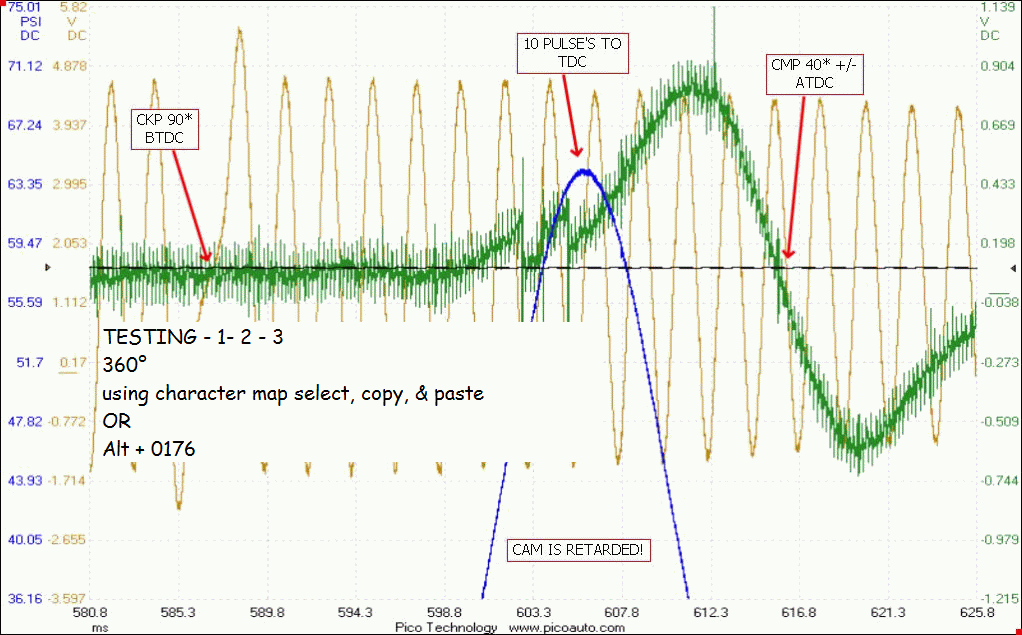
A bit of trivia...
I have noticed people mostly use the asterisk for degrees when using CWV.
Pressing CTRL + D will give you a degree symbol ( looks prettier ;) )

:-*
image_tmp7223.jpg (17 KB | )
Title: Re: ctrl+d
Post by Mick on Sep 13th, 2012 at 4:36am
Rod
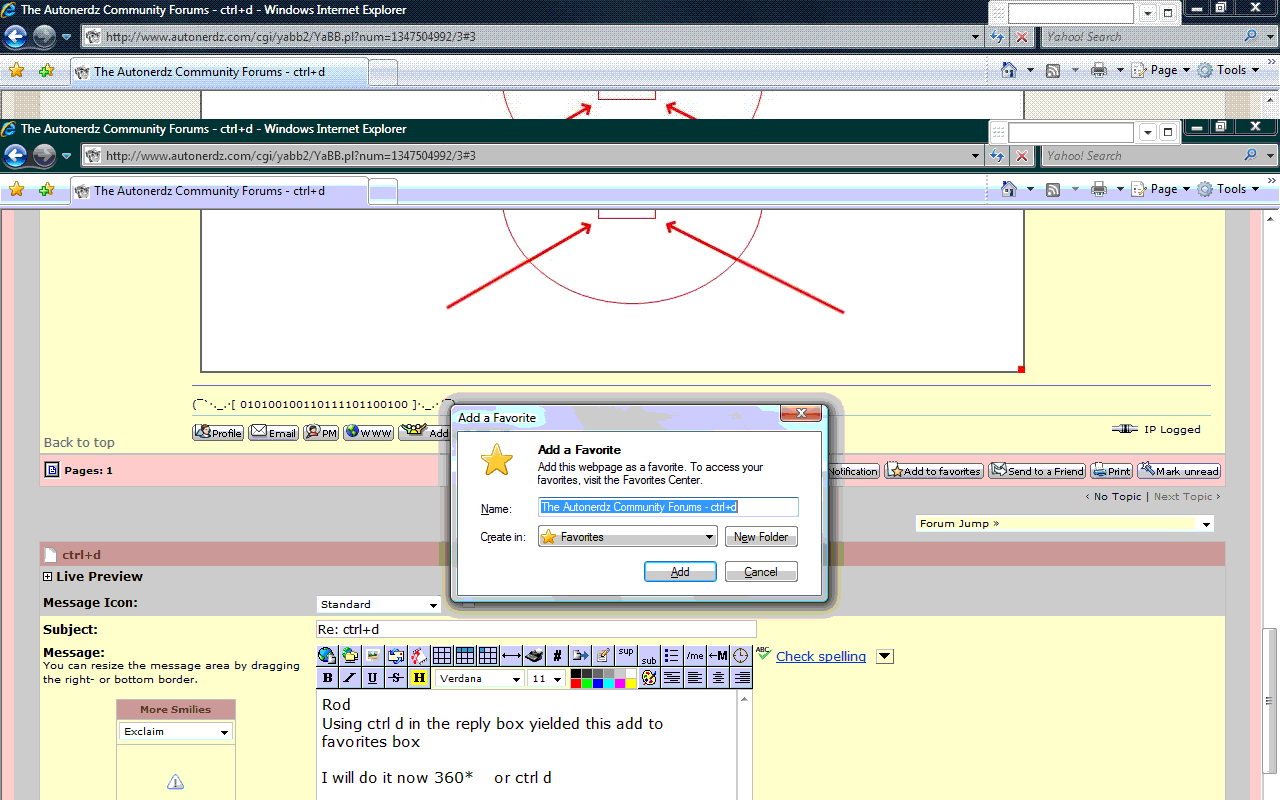
Using ctrl d in the reply box yielded this add to favorites box

I will do it now 360*    or ctrl d


using_ctrl_d_in_the_reply_box_yields_this_pop_up_box_in_Canada.gif (71 KB | )

Title: Re: ctrl+d
Post by daveyK on Sep 13th, 2012 at 4:50am
I tried it in the reply box and got the same.

I wonder if opening the character map would work? by using a select, copy, and paste I can get this - - 25 °


rod_au wrote on Sep 12th, 2012 at 11:12pm:
I have noticed people mostly use the asterisk for degrees when using CWV.


Rod, So that is the command just in CWV for the degree symbol?

Thanks,

dave


Title: Re: ctrl+d
Post by crackerclicker on Sep 13th, 2012 at 6:22am

rod_au wrote on Sep 12th, 2012 at 11:12pm:
when using CWV


oops, we've had a reading comprehension fail.  sorry  :-[, and thanks  ;).

Title: Re: ctrl+d
Post by crackerclicker on Sep 13th, 2012 at 6:24am

Mick wrote on Sep 12th, 2012 at 8:11pm:
Lets give him one of these


lol, it took me the better part of 10 seconds to understand the upside-down wave.

Title: Re: ctrl+d
Post by Mick on Sep 13th, 2012 at 7:37am

crackerclicker wrote on Sep 13th, 2012 at 6:22am:

rod_au wrote on Sep 12th, 2012 at 11:12pm:
when using CWV


oops, we've had a reading comprehension fail.  sorry  :-[, and thanks  ;).


I must be still having one whats CWV?

Title: Re: ctrl+d
Post by daveyK on Sep 13th, 2012 at 7:50am
Mick,


Mick wrote on Sep 13th, 2012 at 7:37am:
CWV?


Rod's program - Compression Waveform Viewer   [smiley=scared0016.gif]

dave

Title: Re: ctrl+d
Post by Mick on Sep 13th, 2012 at 11:10am

daveyK wrote on Sep 13th, 2012 at 7:50am:
Rod's program - Compression Waveform Viewer


But were not using it  [smiley=hairpull.gif]

Title: Re: ctrl+d
Post by rod_au on Sep 13th, 2012 at 11:35am

Mick wrote on Sep 13th, 2012 at 11:10am:
But were not using it [smiley=hairpull.gif]


[smiley=scared0016.gif]
Sorry bout dat. I saw the compression waveform viewer images that Lou posted and thought I would quickly butt in. :)


Title: Re: ctrl+d
Post by daveyK on Sep 13th, 2012 at 11:52am
Mick,

my bad thought you were using CWV  [smiley=embarassed.gif]

However in IrfanView and probably in most programs by using the Character Map the degree symbol can be selected, copied, & pasted in.

OR by using the keyboard "Alt + 0176".

like this:           1234°

here is one of Lou's captures done with IrfanView

HTH

dave
degree_marker.gif (120 KB | )

Title: Re: ctrl+d
Post by Mick on Sep 13th, 2012 at 12:21pm

daveyK wrote on Sep 13th, 2012 at 11:52am:
OR by using the keyboard "Alt + 0176".


Oh No dare I try

Maybe another 24 hrs of  [smiley=hairpull.gif]


ALT+0176 on my keyboard is    360Ż[smiley=laughing2.gif]

Title: Re: ctrl+d
Post by Robski on Sep 13th, 2012 at 12:48pm
on mine =   degree °

thanks for that Dave  :D

Title: Re: ctrl+d
Post by Mick on Sep 14th, 2012 at 5:38am
degree°  360°  I am now a 100% 360°certified key board nerd :)

Thanks Robski

oh and you Dave :-*

Title: Re: ctrl+d
Post by daveyK on Sep 14th, 2012 at 5:57am
I am now a 100% 360° NERDZ certified key board nerd

I fixed it for ya  ;D

dave

Title: Re: ctrl+d
Post by fisher on Sep 14th, 2012 at 2:00pm
115 ... Do I want to add this to my favorites? What?
How do I write the degree symbol?

Title: Re: ctrl+d
Post by daveyK on Sep 14th, 2012 at 3:30pm
Don,


fisher wrote on Sep 14th, 2012 at 2:00pm:
115 ... Do I want to add this to my favorites? What? How do I write the degree symbol?


Press "Alt" key and hold then press 0176 - [disclaimer: this does not work in some programs]
it worked here yesterday but today I get the keyboard beep  >:(

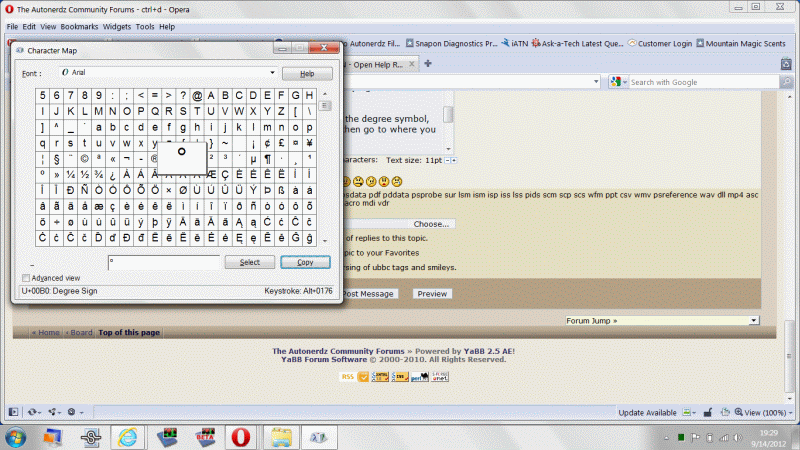
or open the Character map, find the degree symbol, click it to select, click copy, and then go to where you want it and paste it.

12345°

HTH

dave


degree_symbol.gif (102 KB | )

Title: Re: ctrl+d
Post by Tom Roberts on Sep 14th, 2012 at 3:38pm

You guys had me as frustrated as Mick yesterday....

Till I discovered that to do this you have to have the numlok on and it only works with a 10key side panel or the 789uiojklm keys used as a numeric keypad.  It does not work with the number keys across the top of the keyboard.


Title: Re: ctrl+d
Post by daveyK on Sep 14th, 2012 at 3:49pm
Hi Tom and All,

If your laptop has the smaller / different colored numbers on part of the QUERT keys if you press "Alt", "Fn" (function) & hold those two keys, and then press 0176 it should work

like this °

dave

Title: Re: ctrl+d
Post by Tom Roberts on Sep 14th, 2012 at 3:54pm

Nope.

I have to numlok and then alt QUERT key numbers.

°

Title: Re: ctrl+d
Post by daveyK on Sep 14th, 2012 at 3:58pm
Tom,

I'm using a Dell so maybe other computators have a different way of doing it  [smiley=idunno.gif]

dave

Title: Re: ctrl+d
Post by PRESTON on Sep 14th, 2012 at 4:09pm
That is so f ing cool °

Title: Re: ctrl+d
Post by daveyK on Sep 14th, 2012 at 4:27pm
Preston,

If you open the character map there are dozens of symbols and foreign language symbols for each font - hope I don't offend anybody cus I don't know what some of these mean.

ﮱ

ﯔ

Ⱡ

₪

ᶔ

Җ

Ώ

Have fun!!

dave

Title: Re: ctrl+d
Post by crackerclicker on Sep 14th, 2012 at 5:00pm
55°

only got the character map to work, but i think i'll stick to the asterisk sign for degrees ;D.

Title: Re: ctrl+d
Post by daveyK on Sep 14th, 2012 at 5:18pm
Hello Larry,

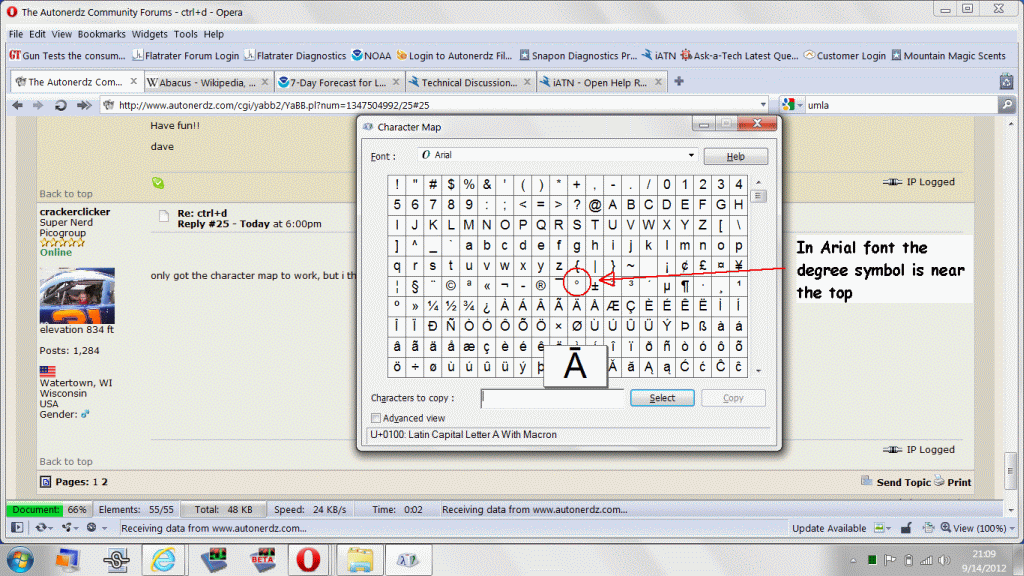
The degree symbol in Arial font is near the top in character map.

Some of the symbols that look like degree mean something else. Character map should display what it means when you click on it.

Did ya see any rolling pins lately?

HTH

dave
degree_symbol_002.gif (158 KB | )

Title: Re: ctrl+d
Post by Mick on Sep 14th, 2012 at 5:54pm

Tom Roberts wrote on Sep 14th, 2012 at 3:38pm:
You guys had me as frustrated as Mick yesterday....


That makes me feels better  [smiley=nerd2.gif]

its was 22°c today with a night temp of 13°c  tomorrow I am going to do a 360° cartwheel.[smiley=dance.gif]

Title: Re: ctrl+d
Post by crackerclicker on Sep 14th, 2012 at 6:09pm

daveyK wrote on Sep 14th, 2012 at 5:18pm:
Did ya see any rolling pins lately?


hahaha!  surprisingly, no.  we celebrated our one year anniversary on the 10th of this month  8-).  i took an old clock, and put one of our wedding pictures inside.  would you believe i got the idea from the nerdz stickers thread?  ;)

Title: Re: ctrl+d
Post by fisher on Sep 14th, 2012 at 9:35pm
I have often wanted to write the degree symbol and lamented there not being one I can use on the laptop.
  DaveyK, where might I find the character map?

Title: Re: ctrl+d
Post by Robski on Sep 15th, 2012 at 12:01am
all programs > accessories > system tools


Title: Re: ctrl+d
Post by daveyK on Sep 15th, 2012 at 1:54am
Hi Don,


fisher wrote on Sep 14th, 2012 at 9:35pm:
where might I find the character map?


click the start button and then


Robski wrote on Sep 15th, 2012 at 12:01am:
all programs > accessories > system tools


once you find it you can always right click, drag, & drop onto the desktop to make a shortcut there

HTH

dave

Title: Re: ctrl+d
Post by fisher on Sep 15th, 2012 at 6:28am
Thank you DaveyK, 360° all the way around.

Title: Re: ctrl+d
Post by daveyK on Sep 15th, 2012 at 3:52pm
another one that we can use is "Alt" + 0181 for µ

like:
10µs
10µv
10µA

dave

Title: Re: ctrl+d
Post by Mick on Sep 15th, 2012 at 4:03pm

daveyK wrote on Sep 15th, 2012 at 3:52pm:
another one that we can use is "Alt" + 0181 for µ

like:
10µs
10µv
10µA

dave


I like to capture my secondary waves with a 1µs sample interval or less

Thanks Dave 

Title: Re: ctrl+d
Post by Robski on Sep 15th, 2012 at 11:38pm
same here 1µs or less  [smiley=happy.gif]

Title: Re: ctrl+d
Post by Robski on Sep 15th, 2012 at 11:47pm
alt + 236 = ∞ infinity
alt + 0177 = ± plus minus

Title: Re: ctrl+d
Post by rod_au on Sep 16th, 2012 at 3:21am
testing..

100µs
360°
10±1
∞

Title: Re: ctrl+d
Post by rod_au on Sep 20th, 2012 at 1:16am
This is
A Multiple
Line
Test
With 5 Lines...

Title: Re: ctrl+d
Post by Danny Berry, Sr. on Sep 20th, 2012 at 4:11pm
Ctrl A=auto highlights all text to copy to clipboard :D
Ctrl B=±
Ctrl C=˘
Ctrl D=°
Ctrl [email protected]
Ctrl M=μ
here's my scheme so far.. 8-)

The Autonerdz Community Forums » Powered by YaBB 2.5 AE!
YaBB Forum Software © 2000-2010. All Rights Reserved.