| The Autonerdz Community Forums | |
|
https://yabb.autonerdz.com/cgi/yabb2//YaBB.pl
General Public Area >> PicoScope >> Inverted scope display https://yabb.autonerdz.com/cgi/yabb2//YaBB.pl?num=1333121198 Message started by liteace on Mar 30th, 2012 at 7:26am |
|
|
Title: Inverted scope display Post by liteace on Mar 30th, 2012 at 7:26am
Hi All, I was having a play today, got here an old 1987 Merc 230, I selected, Ignition > Distrubitor > Secondary (king lead) and got nothing on the screen, it was only when I moved the trigger right down did I get an inverted waveform, is there anywhere I can click to invert the waveform & any idea why it was inverted ?
|
|
Title: Re: Inverted scope display Post by drdiesel1 on Mar 30th, 2012 at 7:31am
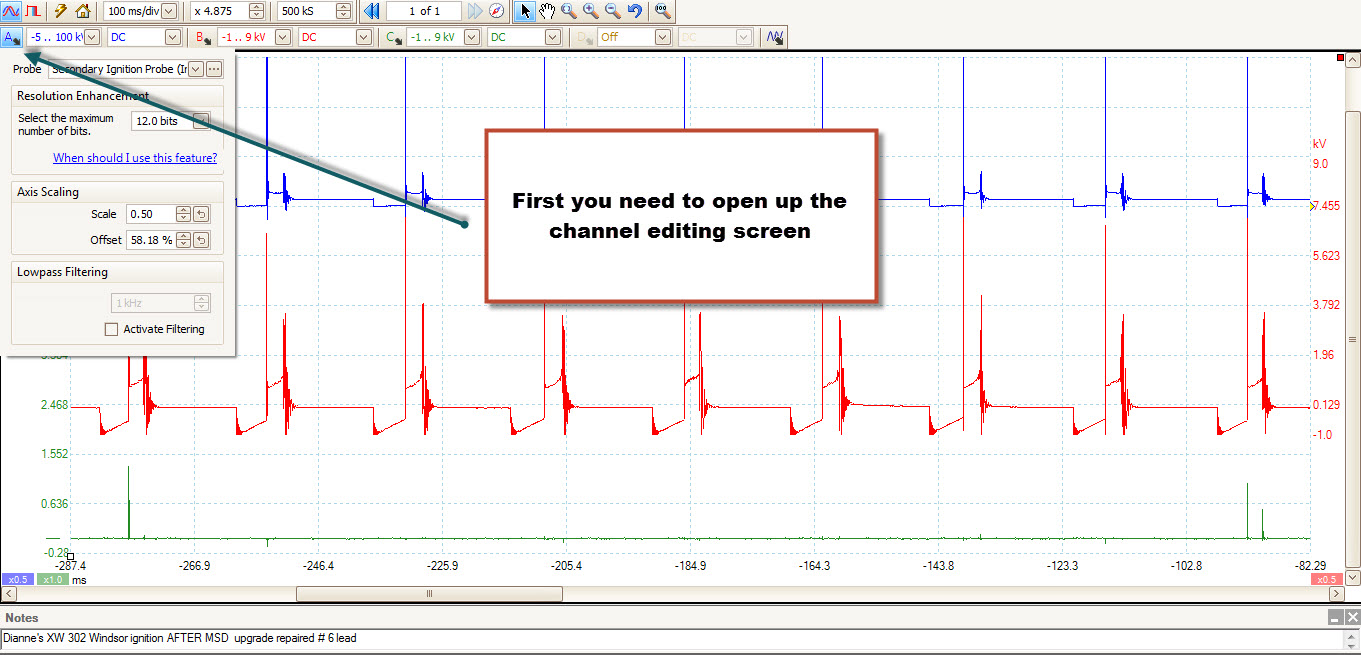
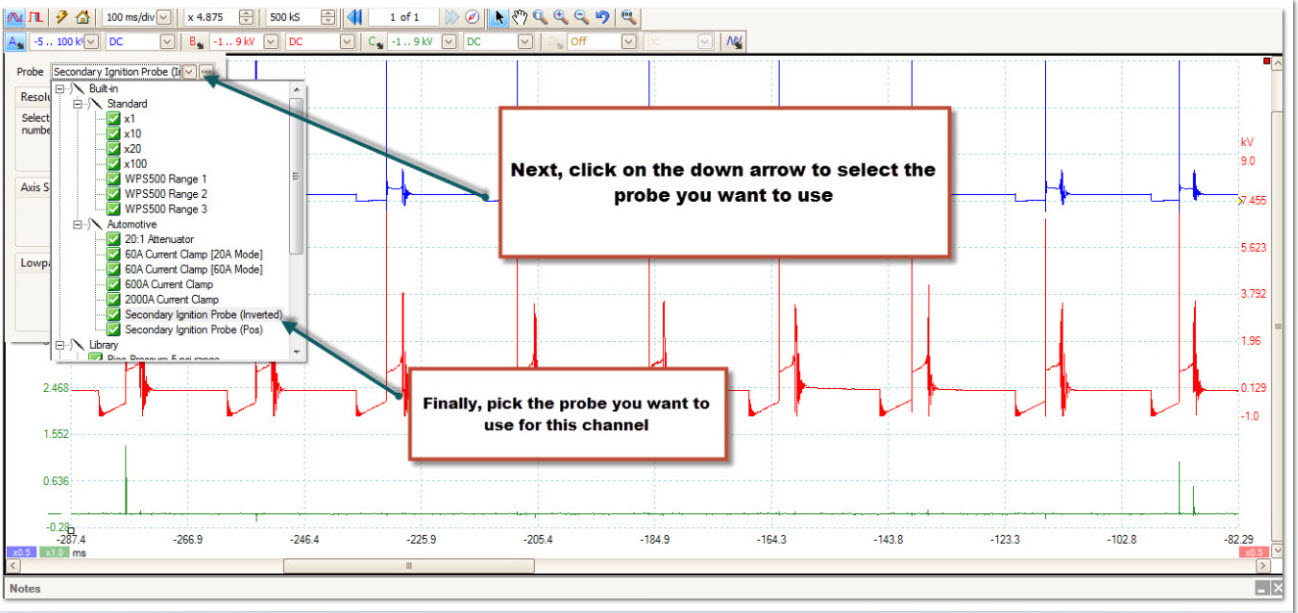
In the probe settings. Just choose the inverted or positive probe, as needed. You had to pick one to set it up.
Didn't you notice it has two choices ? |
|
Title: Re: Inverted scope display Post by liteace on Mar 30th, 2012 at 7:35am drdiesel1 wrote on Mar 30th, 2012 at 7:31am:
Thanks for the info, I was using the auto-probe MI074 that came with the kit, do I need to select the: secondary ignition probe (inverted) everytime i use this ? Thanks Again |
|
Title: Re: Inverted scope display Post by drdiesel1 on Mar 30th, 2012 at 7:42am liteace wrote on Mar 30th, 2012 at 7:35am:
The true signal is what you're seeing. Most standard ignition scopes invert the signal automatically. Pico gives the true signal and you do as you please with it. I learned how to read ignition systems on an old Sun machine, so I like it inverted because that's what I'm use to. You can do whatever you like. That's the beauty of a Pico [smiley=smiley-dance013.gif] |
|
Title: Re: Inverted scope display Post by liteace on Mar 30th, 2012 at 7:47am
As you say most of the other scopes Ive had appart from the fluke was all auto, so when plugging into a conventional ignition system you got the waveform on the screen and didnt have to touch anything, with the Pico Ive still got a lot to learn, i'll get there one day
Thanks for your help |
|
Title: Re: Inverted scope display Post by drdiesel1 on Mar 30th, 2012 at 7:55am liteace wrote on Mar 30th, 2012 at 7:47am:
Now you're learning [smiley=thumbsup2.gif] You're welcome too [smiley=smiley-dance013.gif] If you look in the help section in the tool bar of Pico Scope, you'll find a wealth of information the will help you [smiley=ok.gif] |
|
Title: Re: Inverted scope display Post by liteace on Apr 1st, 2012 at 4:01am
I did look in the help section, help > search, typed in "invert" & "inverted" it only come up with maths channels & digital setup dialog, nothing about custom probes !
Thanks |
|
Title: Re: Inverted scope display Post by benb on Apr 1st, 2012 at 4:57am
Hi Liteace
Don't know if you looked at the 'automotive' option on the top toolbar. This will give you options of ignition set ups It gives a good starting point that you can tweak till you get what you like. HTH Iain |
|
Title: Re: Inverted scope display Post by Brad H on Apr 1st, 2012 at 5:08am
Hi Liteace,
first up, you are using the presets from the menu in the pico program.This isn't a good choice, they aren't ideal settings. Use the probes that in the channel menu instead. Here's a couple of pics to show you what I mean ;) The only good thing about the presets in the pico menu is the tutorials for each test. Liteace__1.jpg (257 KB | ) Liteace__2_001.jpg (183 KB | ) |
|
The Autonerdz Community Forums » Powered by YaBB 2.5 AE! YaBB Forum Software © 2000-2010. All Rights Reserved. |