| The Autonerdz Community Forums | |
|
https://yabb.autonerdz.com/cgi/yabb2//YaBB.pl
General Public Area >> Autonerdz Site Issues >> False topic notifications https://yabb.autonerdz.com/cgi/yabb2//YaBB.pl?num=1300941621 Message started by Irwin on Mar 23rd, 2011 at 8:40pm |
|
|
Title: False topic notifications Post by Irwin on Mar 23rd, 2011 at 8:40pm
In the last week I've received several false topic notifications, just thought I'd mention it.
|
|
Title: Re: False topic notifications Post by Daniel on Mar 23rd, 2011 at 9:24pm
Me too, but over more than a week. A month I would say.
|
|
Title: Re: False topic notifications Post by crackerclicker on Mar 23rd, 2011 at 9:49pm
that's funny. i still get notifications for my modis for sale post. you'll notice sometimes old threads that you have read before will have the "new" icon on them again. are you getting notifications for topics that are now "new"?
i wonder if there's a way to fix this in your user cp. never looked into it before, but i suppose it's worth a peek now that you've brought it up. EDIT: just looked into the user cp. you can change the notifications in the "posts" tab of your control panel. still don't know if there's a way to stop old messages from becoming "new" again. |
|
Title: Re: False topic notifications Post by Tom Roberts on Mar 24th, 2011 at 6:47am The old posts going new again on the boards has to do with browser settings and how long followed links are remembered. That's why topic notifications appear at the top for old posts sometimes. You can renew them. |
|
Title: Re: False topic notifications Post by Daniel on Mar 27th, 2011 at 8:23am
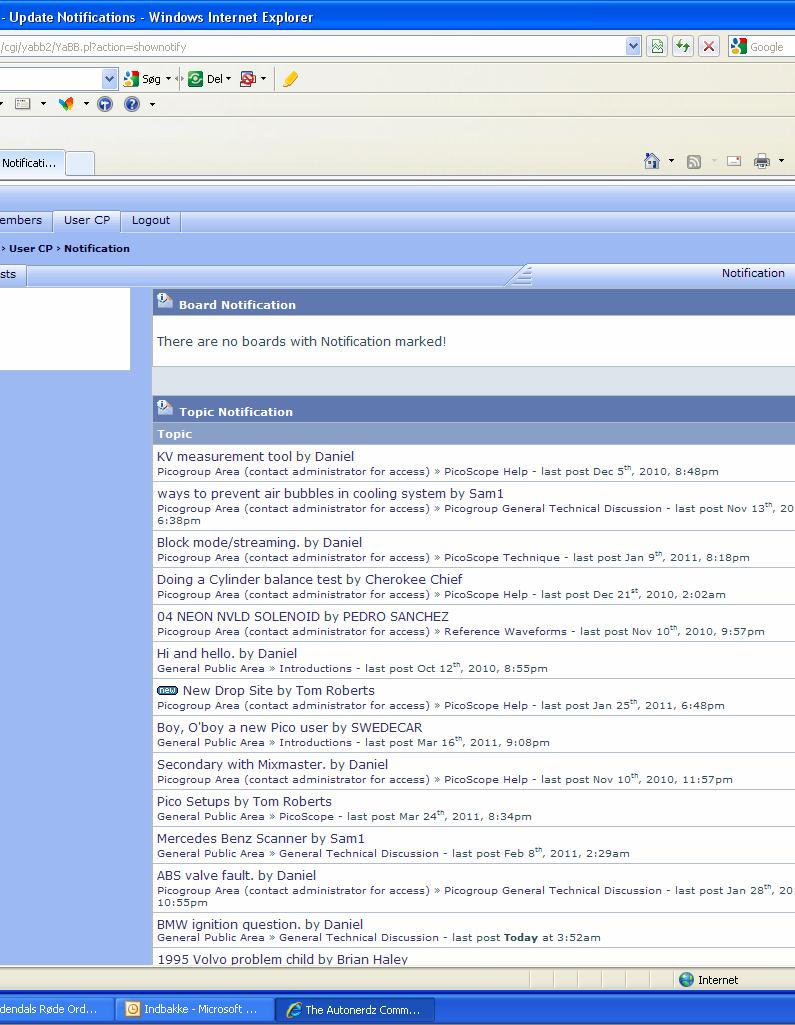
Got one more today. New drop site, last post was jan 25th.
Tom can you explain a little more, what I can do to avoid these false notifications. Notification-2.JPG (140 KB | ) |
|
Title: Re: False topic notifications Post by Tom Roberts on Mar 27th, 2011 at 8:54am Daniel, There in the topic notification area, check all and then 'Update Notifications'. This will renew them all. Do this once a month or before your browser history expires and then the followed links won't time out. |
|
Title: Re: False topic notifications Post by Daniel on Mar 27th, 2011 at 9:30am
Thanks Tom, but sorry I don’t get it. :(
It’s the other way around. When I open the forum, I get a message that there is a new post, in a topic that I follow. But when I open notifications by clicking yes, it’s just a topic without any news. It’s only a “box” on the site, not an email. |
|
Title: Re: False topic notifications Post by Tom Roberts on Mar 27th, 2011 at 8:37pm Yes I know, Daniel. This has to do with your browser history settings renewing followed links after a given time. The solution is as I described. When you update notifications you reset the clock. Do this regularly and you will no longer get false notifications. |
|
Title: Re: False topic notifications Post by Daniel on Mar 28th, 2011 at 4:09am
Thanks Tom.
I’ll just do that, and see how it goes. :) Daniel. |
|
Title: Re: False topic notifications Post by Tom Roberts on Apr 6th, 2011 at 8:12am Sorry, Checking removes them. Just hit update button :-[ |
|
Title: Re: False topic notifications Post by Daniel on Apr 6th, 2011 at 11:31pm
Yes, I found out. :)
I saw a pattern that after about 2 month, after the last post in the thread, the false notification came. Is it just an information, that it has timed out and you’ll not get any notifications in the future if anyone would pick up the old thread. Perhaps it’s possible to set it/the forum to never time out. :-/ |
|
Title: Re: False topic notifications Post by Tom Roberts on Apr 7th, 2011 at 8:15am Quote:
That would be nice but it's not a forum thing. It's a browser thing. |
|
The Autonerdz Community Forums » Powered by YaBB 2.5 AE! YaBB Forum Software © 2000-2010. All Rights Reserved. |