The Autonerdz Community Forums
https://yabb.autonerdz.com/cgi/yabb2//YaBB.pl
General Public Area >> Autonerdz Site Issues >> Major Forums Upgrade
https://yabb.autonerdz.com/cgi/yabb2//YaBB.pl?num=1229212918

Message started by Tom Roberts on Dec 13th, 2008 at 4:01pm

Title: Major Forums Upgrade
Post by Tom Roberts on Dec 13th, 2008 at 4:01pm

Coming Soon.......

A major forums upgrade.  This is a 7 on my difficulty list and a 10 on my scary list.   [smiley=eek.gif]

I don't have a date for this, just giving you a heads up that it will be happening.  

During the upgrade you will not be able to access the forums.  You may get a maintenance message or just a fatal browser page, depending on what stage I am in the process.

I do not know how long things will be down once I start.  It all depends on how it goes and how many screw ups I make  ::)

I will try to task this in such a way as to minimize the down time.

My last experience with this almost blew my cerebral cortex.   [smiley=banghead.gif]

Hopefully we won't have any  [smiley=ups.gif]

Wish me luck.....

Title: Re: Major Forums Upgrade
Post by Carl Grotti on Dec 13th, 2008 at 11:50pm
Oh man... glad I'm not the one doing this. Didn't you loose some hair the last time you did this?

Disclaimer:

If anything goes wrong, I had nothing to do with it.

Good luck, partener.  ;)

Title: Re: Major Forums Upgrade
Post by Tom Roberts on Dec 24th, 2008 at 10:32am

For any of you that noticed the forums in maintenance mode this morning....

Nope, I did not complete the upgrade.  Got as far a a backup and then got sidetracked.  Soon though.  That was good practice.   ;)

I have the new forums framework built now and verified that it works and just have to move the data and then configure a few things.  


Title: Re: Major Forums Upgrade
Post by Tom Roberts on Dec 30th, 2008 at 9:10pm

Happy New Year and welcome to the new forums.  They may not look all that new at first glance but explore and you will find some new features and improvements.

Be sure to update your profile to see that the settings are as you want them.  Some may have changed and there are more options there to set.

Hope you like it.  Please let me know if you run into any issues.  I am still squishing a few bugs.   [smiley=tongue.gif]

Title: Re: Major Forums Upgrade
Post by Earl Davis on Dec 31st, 2008 at 5:01am
Tom

I have noticed a significant increase in the speed when navigating through the forums.

Earl

Title: Re: Major Forums Upgrade
Post by Tom Roberts on Dec 31st, 2008 at 7:38am

Good to hear that, Earl.  It seemed faster to me but I wasn't sure.  

I had a rough day yesterday with this.  Something went terribly wrong just as I was finishing and I had to start over from scratch.   :-[

I had a backup though....

Don't be surprised to see the maintenance message come up more now than in the past.  This build has a server backup function and when this is in use, the forums are taken offline.  I'm not sure I will use it but I have to try it.  I'll probably still backup locally though.

Title: Re: Major Forums Upgrade
Post by Danny Berry, Sr. on Dec 31st, 2008 at 8:02am

Quote:
Be sure to update your profile to see that the settings are as you want them.  Some may have changed and there are more options there to set.


Hi Tom,

How do you do this ?

I went to mine but I dont see how to edit it? :-?

Thanks,

Danny

Title: Re: Major Forums Upgrade
Post by Tom Roberts on Dec 31st, 2008 at 8:19am

Danny,

This works pretty much like the old forums.  Go to:

User CP tab
Profile tab
Edit Profile
Enter password confirmation when prompted

If you have any questions about what's in there, I will try to answer.

In the past there has been some confusion about the Hide Email from public option....The public can't see any emails anyway.  Only members can.  So, checking that box hides your email from forum members but not the admin.

There is a lot of info in the Help tab.  They have really improved the documentation in there about how it all works.  Check it out...

Title: Re: Major Forums Upgrade
Post by Danny Berry, Sr. on Dec 31st, 2008 at 9:01am
Thanks Tom,

I missed step one... clicking on the user contop panel tab. ::)

I like what I see so far. I noticed that you have to go into and out of the folders to reset the new post blinking lights, I guess due to the upgrade? There are no new post on some of these, but know big deal ;)

Danny

Title: Re: Major Forums Upgrade
Post by Tom Roberts on Dec 31st, 2008 at 10:27am


Quote:
I noticed that you have to go into and out of the folders to reset the new post blinking lights


Yup.  You may also find that some of your PMs are tagged as new but are not new.  

It's a whole new forums engine....took me as long to change it as it used to take me to do a V8 engine in a Ford truck.   ::)

Title: Re: Major Forums Upgrade
Post by Mick on Dec 31st, 2008 at 2:50pm

Tom Roberts wrote on Dec 30th, 2008 at 9:10pm:
Happy New Year and welcome to the new forums.  They may not look all that new at first glance but explore and you will find some new features and improvements.

Hope you like it.  Please let me know if you run into any issues.  I am still squishing a few bugs.   [smiley=tongue.gif]


Tom

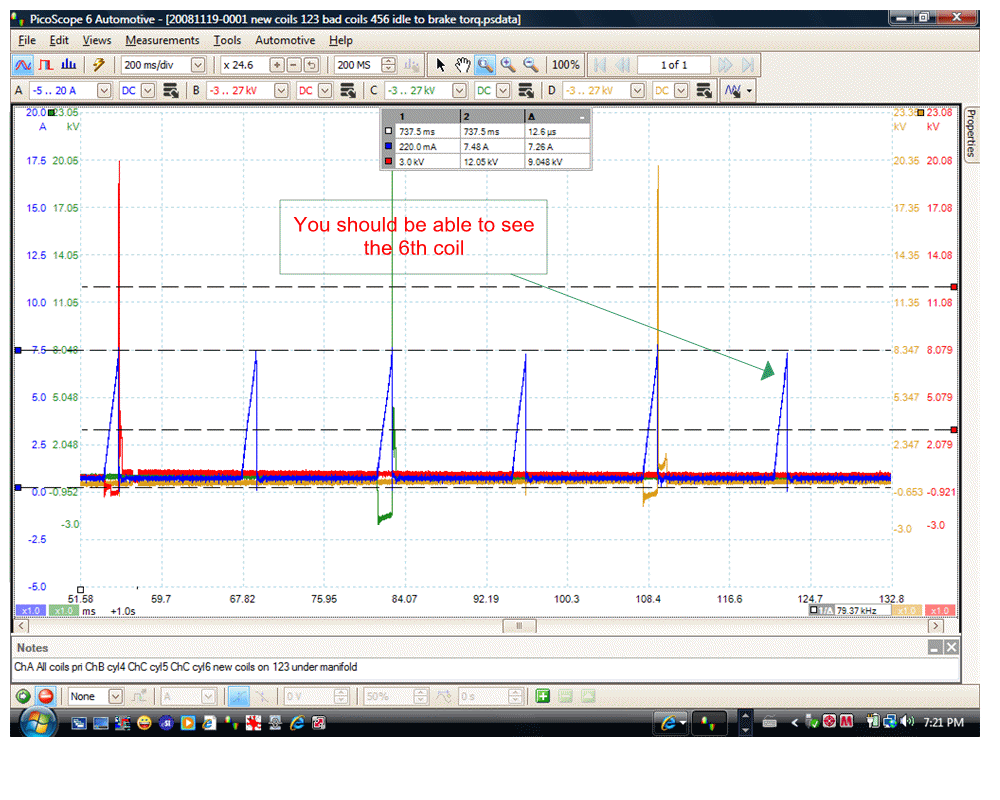
It maybe me but if a gif is to wide the slide bar that use to be on the bottom of the file seems to be missing.

Mick

coil_on_plug_extention_leads_with_pico_001.gif (113 KB | )
Title: Re: Major Forums Upgrade
Post by Tom Roberts on Dec 31st, 2008 at 3:01pm

Mick,

I can see the whole image on my wide screen.  The images are displayed differently now.  No more scroll bars to work around in the larger images.  Just click on the image and it will open up in a grey box display.  If there are multiple images in the post (we can do that now), you can click through them, which highlights each one.  This allows a larger view with scroll, if needed.  You can also click on the file name and bring it up in another window.

Try it.  I hope you like it better.  

Title: Re: Major Forums Upgrade
Post by TCROfreak on Dec 31st, 2008 at 4:41pm
I am not receiving emails that there has been a reply to topics I am watching.  I made sure that I have the box check to receive emails. Is anyone else having this problem?

Title: Re: Major Forums Upgrade
Post by Tom Roberts on Dec 31st, 2008 at 5:00pm

I am too, Howard.  I'll have to look into this.  The mail system is working because I am getting other notifications.

Title: Re: Major Forums Upgrade
Post by fisher on Dec 31st, 2008 at 5:14pm
Yeah, click the GIF and it comes out great. Also, can add more than one attachment per post.

Title: Re: Major Forums Upgrade
Post by daveyK on Dec 31st, 2008 at 5:15pm
I am running Opera as my browser. Since approximately 18:30 EST if I login my name shows up in the users online however the login tab in the menu doesn't show up. If I try to go into the general discussion area I get an error message and I can not logout.

IE works OK and I need to use IE to logout and refresh Opera to get my name off the user online list.

Is this a problem on my end??

Happy New Year to all!!  :D

thanks,
dave

Title: Re: Major Forums Upgrade
Post by Tom Roberts on Jan 1st, 2009 at 9:27am

Dave,

When that has happened in the past it has always been a cookie handling problem.  Check cookie options.  

Title: Re: Major Forums Upgrade
Post by Tom Roberts on Jan 1st, 2009 at 12:38pm


Quote:
I am not receiving emails that there has been a reply to topics I am watching.


Howard,

I changed a setting to fix this.  Go to edit your profile and under Options, find Post and Board Notifications.  Select yes to Notify Me of new Notifications by Email.

You would not have seen this before because it wasn't there.  Is now....


Title: Re: Major Forums Upgrade
Post by daveyK on Jan 1st, 2009 at 4:55pm
Hi Tom,

Happy New Year!

I checked my cookie settings, nothing changed there. I tried this evening and it's working  :-? go figure

musta been something on my end.

Thanks,

dave

Title: Re: Major Forums Upgrade
Post by Tom Roberts on Jan 4th, 2009 at 8:44am
Good news and bad news.....I thought I was being smart waiting till this new build had been out for a few months before doing it.  Silly me.

We have a few bugs here...one of which makes the search function not work.  Very soon an update for the update that is supposed to fix this stuff.  That's the good news.

The bad news is that I'll have to take the forums down again for a short time to do this update.

No worries.....I'll git er done.

Dave,

Glad it's working for you now.   :)

Title: Re: Major Forums Upgrade
Post by Rick Hill on Jan 4th, 2009 at 12:36pm
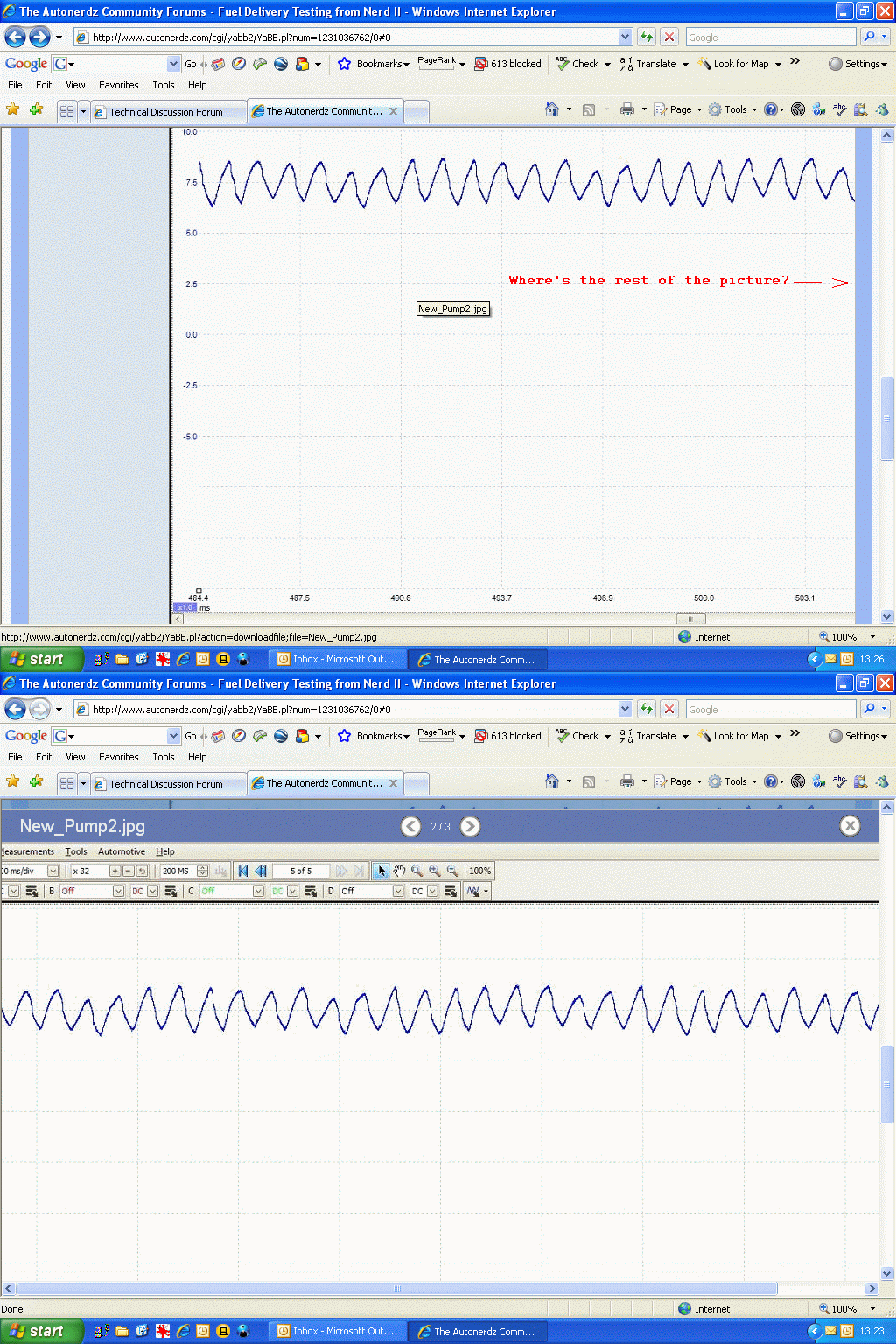
Tom what do I need to change to view a complete image in the upgraded forum?

The right side is missing but I can click on the image and it will open to a new screen with the ability to scroll left and right.
 Below is how images look before and after clicking on them.
 Of course I can't see all of those either. I can only read the added text to " where's the rest of"  and "the picture is" is cut off.
forum_images_merged.gif (318 KB | )

Title: Re: Major Forums Upgrade
Post by Tom Roberts on Jan 4th, 2009 at 2:32pm
Rick,

Not sure I understand the question fully.  

Clicking on the image is one way to view larger images that are not fully visible in thread view.  Then they open up in a viewing box that allows you to scroll them and see all the image.

The other way is to click on the image file name above the image and open it up in another browser window, which also allows a larger view and scroll bars to slide larger images.

The scroll bars that used to appear around larger images in thread view have been eliminated.

Title: Re: Major Forums Upgrade
Post by Rick Hill on Jan 4th, 2009 at 5:05pm

Quote:
The scroll bars that used to appear around larger images in thread view have been eliminated.


 That explains it Tom. Thanks.
I'll get used to it just that all the images complete or not look cut off on the right side like there is part of it missing and in a lot of cases there is. You can't tell until you open them in a new window or the viewer. :)

Title: Re: Major Forums Upgrade
Post by TCROfreak on Jan 4th, 2009 at 8:10pm
Tom,
Is there a way to get an e-mail notification if somebody starts a new thread?  If so how?
;D

Title: Re: Major Forums Upgrade
Post by Tom Roberts on Jan 4th, 2009 at 9:17pm


Quote:
Is there a way to get an e-mail notification if somebody starts a new thread?


I think you want Board notification.  When viewing a board you should see a notification button.  Pushing this button will enable you to choose to receive notifications for all new posts or new topics only.  Do this for each of the boards you want notification for.  

Never tried this but it should send an email, if you have selected to receive emails for notifications in your profile options.

Title: Re: Major Forums Upgrade
Post by daveyK on Jan 5th, 2009 at 6:15am
hi all,


Quote:
Never tried this but it should send an email,


Yes, you will receive an email notification.

HTH

dave

Title: Re: Major Forums Upgrade
Post by Tom Roberts on Jan 9th, 2009 at 2:08pm

OK....done with the update to the update.  Some bugs are fixed.  Time will tell.

So, welcome to the new, new Autonerdz Community Forums   :-?

Title: Re: Major Forums Upgrade
Post by Mick on Jan 9th, 2009 at 4:52pm

Tom Roberts wrote on Jan 9th, 2009 at 2:08pm:
OK....done with the update to the update.  Some bugs are fixed.  Time will tell.

So, welcome to the new, new Autonerdz Community Forums   :-?


Tom

You forgot to put the multi download feature back in ;)

Mick

oops no you didnt it is there under the + button :-[

Title: Re: Major Forums Upgrade
Post by Tom Roberts on Jan 9th, 2009 at 5:06pm

Mick,

Yeah, I fell for that one too.   :P

Now, the multi attachments are hidden and tou have to add them with the plus.

Title: Re: Major Forums Upgrade
Post by Tom Roberts on Jan 12th, 2009 at 9:11am
We are having a problem with the file size limit.  The 8000kb limit is not allowing files that large.  Not sure where the limit is but I found that a 5000kb file was not allowed.  I increased the limit to 15,000 and still no go on a 5000kb file.

Now I set it  for no limit.  Still can't upload a 5000kb file.

So, we have a little problem here we are working on.  Hope to get this resolved soon.

Thanks for your patience.

Title: Re: Major Forums Upgrade
Post by Earl Davis on Jan 13th, 2009 at 11:15am
Tom

I have noticed since the upgrade that sometimes when I am signed in my screen name does not show as an member online? Not sure if it matters just thought I would mention it in case it is something you need to be aware of.

Earl

Title: Re: Major Forums Upgrade
Post by Tom Roberts on Jan 13th, 2009 at 11:24am

It does on my end, Earl.  Might have to refresh the page to show that you are logged in at the bottom of the page.

On another current issue that happened yesterday.....the forums are no longer sending out any emails.  We are working in this issue as well.  This problem prevents new members from receiving the validation email so they can't register, as well as the notifications, etc.

Title: Re: Major Forums Upgrade
Post by Wilf on Jan 13th, 2009 at 7:43pm
Tom

The name deal happened to me as well several times today. Only happened if I closed my browser and reopened it without loging out.
I just relogged in and my name reappeared. I was still logged in and had full function to go everywhere just my name was missing

Wilf

Title: Re: Major Forums Upgrade
Post by Tom Roberts on Jan 13th, 2009 at 8:34pm
Wilf,

The default was to log you out when you close the browser.  If you want to stay logged in, you can change that in the 'logged in for' choices in the login area at the botttom of the entry page.

I changed it back to 6 hours default log in time.

Title: Re: Major Forums Upgrade
Post by daveyK on Jan 14th, 2009 at 8:11am
Hi Tom,


Quote:
On another current issue that happened yesterday.....the forums are no longer sending out any emails.  We are working in this issue as well.


the email notification is working again as of 1/2 hour ago i got 6 of em.

thanks  ;)

dave

Title: Re: Major Forums Upgrade
Post by Tom Roberts on Jan 14th, 2009 at 8:15am

Dave,

That's great.  I got lots of them too this morning when I fired up my PC.

Not sure what had happened yet.  I didn't fix it.  This was not a problem with the Yabb system but something at my host server.  I have been in contact with the support staff there and looks like they found the problem.  

woo hoo    [smiley=jump.gif]

Title: Re: Major Forums Upgrade
Post by Tom Roberts on Jan 14th, 2009 at 1:13pm

The problem we were having with uploading larger files noted in reply #29 has been resolved.

This was a problem with the YaBB source code and the YaBB development team has issued a fix.  I have installed this and all seems to be working fine now.

I have restored the previous file size limit of 8Mb.

So...upload at will.

Please report any more issues you might be having here and I will look into them.

At his point, this was the last issue on my list....for now   [smiley=banghead.gif]

The Autonerdz Community Forums » Powered by YaBB 2.5 AE!
YaBB Forum Software © 2000-2010. All Rights Reserved.